

Skip to content

Real-time AI face swap

Swap your face on camera, live in Chrome.

SwapCam replaces your face in your webcam feed as it streams, so browser-based video calls pick it up as an ordinary camera.

Before you download

SwapCam alters your camera feed in real time. Please review our terms and responsible-use guidelines before installing the extension.

Download
How to install
  • Live preview
  • Minutes to set up
  • No desktop app
  • Chrome
  • Windows
  • macOS
  • Linux

Works in Chrome on Windows, Mac and Linux. No GPU — 4GB of RAM is enough to get running.

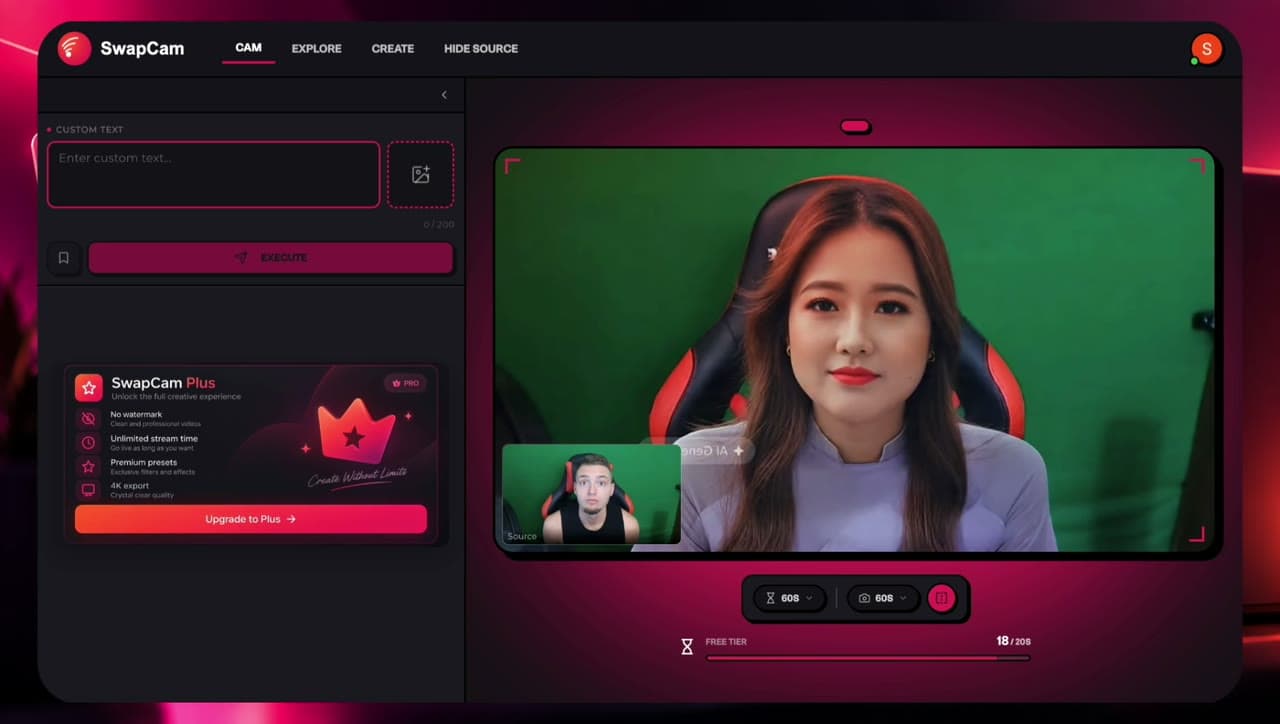
SwapCam during a call — pick a source face and the transformed feed goes out as your camera.

The same camera, before and after.

Drag the divider to compare the original webcam frame with the transformed one.

Camera feed with the SwapCam transformation applied
Original camera feed before transformation
BeforeAfter

What it actually does.

AI camera

AI that works with your camera

SwapCam reads your webcam feed and applies the transformation as it streams, so what you see in preview is what your call sees.

  • Live preview before you join
  • Face tracking that follows your movement
  • Adjustable source selection

Video calls

Built for video calls

Point your supported browser-based video application at the SwapCam camera source and your transformed feed goes out like any other webcam.

  • Works with supported browser video apps
  • Selectable as a camera source
  • No separate desktop capture tool

Setup

Simple enough to set up in minutes

Four steps from download to your first swap. No build tools, no command line, no model downloads to manage by hand.

  • Unpacked extension install
  • No command line required
  • Guided in-page walkthrough

Why it’s simple to run.

Real-time transformation
Transform your camera feed while you're on a video call — no rendering step, no post-production.
Runs through Chrome
Use SwapCam through a lightweight Chrome extension instead of installing a massive desktop AI application.
Lightweight setup
Designed to run without building an expensive high-end AI workstation first.
Simple installation
Download, extract, load the unpacked extension, and start using it. That's the whole flow.

Installing it takes four steps.

No command line and no build tools. Chrome loads the extension straight from the folder you extract.

The full install, start to finish. Prefer to read? The same four steps are written out below.
  1. Download the latest SwapCam Chrome extension ZIP to your computer.

    A file manager Downloads folder containing swapcam.zip

Before you download

SwapCam alters your camera feed in real time. Please review our terms and responsible-use guidelines before installing the extension.

Download

Once it’s installed.

The flow every time you want a transformed camera.

  1. 01Open Chrome
  2. 02Open your supported video-call website
  3. 03Click the SwapCam extension
  4. 04Choose your source face
  5. 05Enable camera transformation
  6. 06Select SwapCam as your camera source if required
  7. 07Join your call
  8. 08Enjoy real-time transformation

Made for people on camera.

Content creators

Create unique live video content without complicated production hardware.

Streamers

Experiment with different on-camera identities and visual styles.

Video calls

Use supported browser video applications with your transformed camera.

Creative experiments

Explore real-time AI transformation in a simple browser workflow.

If Chrome runs, SwapCam runs.

Windows, Mac or Linux — SwapCam works inside the Chrome you already have. No dedicated graphics card, and no high-end AI machine.

  • Chrome

    The only install you need. SwapCam loads as an extension.

  • Windows

    Runs in Chrome for Windows.

  • macOS

    Runs in Chrome for Mac, on Intel and Apple silicon.

  • Linux

    Runs in Chrome for Linux.

Memory
4GB RAMThe minimum to get up and running.
Graphics
No GPU requiredNo dedicated graphics card and no AI workstation.
Install size
One ZIPExtract the folder and load it in Chrome.

What you need.

Chrome
A supported version of Google Chrome.
SwapCam extension
The downloaded ZIP extracted into a local folder.
Camera
A working webcam or camera.
Compatible website
A supported browser-based video application.

Create responsibly.

Only use faces and likenesses you have permission to use. Don’t impersonate real people for fraud, harassment, deception, or other harmful activity.

If your use case involves synthetic or altered media, follow the rules and disclosure requirements that apply to your platform and location.

Questions, answered.

SwapCam is a Chrome extension that applies a real-time AI face transformation to your camera feed, so supported browser-based video applications can use the transformed feed as their camera source.

Install SwapCam and swap your camera feed.

Download the ZIP, load it as an unpacked extension in Chrome, and pick your source face.

Before you download

SwapCam alters your camera feed in real time. Please review our terms and responsible-use guidelines before installing the extension.

Download
View installation guide